Key takeaways
- IPTV delivers TV channels as data streams over the internet to a player app on your device.
- Large channel counts are inflated by duplicate qualities, regional copies, empty event channels and loops.
- What matters is whether your channels are present, stable and covered by the programme guide.
- Audit any lineup with a short must-have list before you subscribe.
"Access thousands of live channels" is the headline of almost every IPTV offer. It sounds like unlimited choice, but in practice most households watch a few dozen channels at most, and a huge lineup can make the service harder to use, not easier.
This guide explains how an IPTV channels subscription works, what really sits behind big channel numbers, and how to check a lineup before you pay for it.
What is IPTV?
IPTV stands for Internet Protocol Television: television delivered as data over an internet-protocol network rather than through an aerial, satellite dish or traditional cable. There are two broad kinds:
- Managed IPTV, where an internet provider delivers TV over its own network to a set-top box — the TV services of many phone and broadband companies work this way.
- Internet (over-the-top) IPTV, where a provider streams channels over the public internet to an app on any device. This is what most people mean when they talk about "an IPTV subscription".
How an IPTV channels subscription works
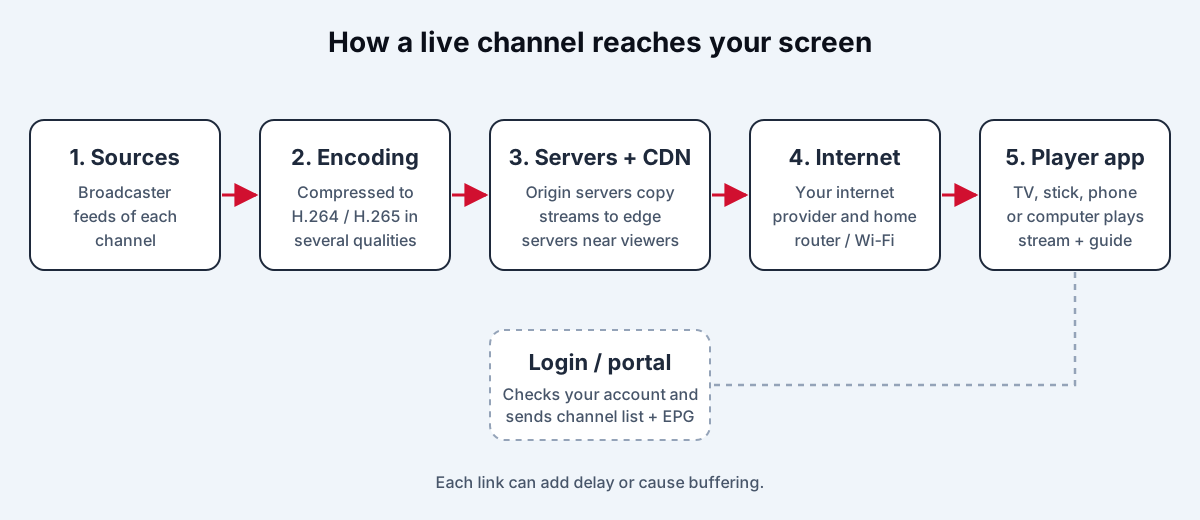
- Sources. The provider receives channel feeds — from broadcasters, satellites or other sources.
- Encoding. Each feed is compressed (usually H.264 or H.265) and packaged into a streaming format.
- Distribution. Streams are served from the provider's servers, often through a content delivery network with servers in several regions.
- Your connection. The stream travels over the internet to your router.
- The player app. An app on your TV, stick, phone or computer plays the stream and shows the programme guide.
Your subscription is essentially permission to access those streams, delivered as an account in the provider's own app or as login details for a third-party player app — an M3U playlist link or an Xtream Codes-style login. Our smart TV setup walkthrough explains both formats.
How it differs from cable and satellite
| Cable / satellite | IPTV | |
|---|---|---|
| Delivery | Dedicated cable or dish | Your internet connection |
| Equipment | Provider's box | Your own devices and apps |
| Screens | Usually tied to boxes | Any compatible device, within your plan's limits |
| Installation | Often needs a technician | Install an app and log in |
| Dependence on internet | None | Total — quality depends on your connection |
What sits behind "thousands of channels"
When a provider advertises 20,000 or 40,000 channels, the figure is almost always the total number of entries in its playlist. Those entries include several kinds of padding.
The same channel in several qualities
A single channel may appear as SD, HD, FHD, 4K and one or more "backup" versions. That can triple or quadruple the count without adding anything new to watch.
Regional copies
National networks often appear in many regional variants — East and West Coast feeds, local affiliates, regional versions in different countries — which show the same programmes much of the time.
Event placeholders
Lists of "PPV" or "Event" channels that only carry pictures when a live event is on, and are blank the rest of the time.
24/7 loop channels
Channels that endlessly repeat a single series or a film collection. They are on-demand content in a live-channel wrapper.
Countries and languages you don't watch
Many big lineups are mostly made up of channels from dozens of countries. Worthwhile if you watch them, clutter if you don't.
None of these is necessarily bad. Backups are useful when a main feed fails, and international channels matter to many households. But the headline number says little about whether the service suits you.
What actually makes a good channels subscription
Your channels, reliably present
A lineup is only as good as the channels you watch. They should be there every day, in the region you expect and under consistent names.
Full programme-guide coverage
The electronic programme guide (EPG) is what lets you browse what's on now and next. A good subscription covers almost all its regular channels with guide data. Channels without guide data are hard to use.
Catch-up and timeshift
Catch-up (sometimes called replay or archive) lets you watch programmes from the past few days on supported channels. Timeshift lets you pause and rewind live TV. Both are more useful in daily life than thousands of extra channels.
Clean organisation
Channels grouped sensibly by country and category, with consistent naming and logos, make a big lineup usable. Good player apps also let you hide groups you never watch.
Lawful sources
A subscription is only worth having if it lasts. Licensed providers deliver channels with the rights holders' permission. Services that rebroadcast pay channels without authorisation are regularly blocked or shut down. Read how to choose a legal IPTV subscription for the warning signs.
How to audit a lineup before you pay
Use this five-minute check during a trial or before ordering:
- List your 15 must-have channels.
- Search for each one in the provider's lineup or ask the provider to confirm.
- Check the guide for each: is today's schedule there and correct?
- Play each one at a busy time and note the quality.
- Check catch-up on the channels where you would use it.
If your must-haves pass, the rest of the lineup is a bonus. If they don't, no number of extra channels makes up for it. For more on comparing tiers and add-ons, see how to compare IPTV channel packages.
Frequently asked questions
How many channels does a household actually need?
Most households regularly watch somewhere between 15 and 30 channels. A lineup that reliably covers those, with a good programme guide and catch-up, is worth more than tens of thousands of entries you will never open.
Is an IPTV channels subscription the same as cable?
It offers similar live channels and a programme guide, but it is delivered over your internet connection to apps instead of through a cable box. That makes it more flexible, but picture quality depends on your connection.
The bottom line
An IPTV channels subscription is a way to receive live TV over your internet connection on the devices you already own. The value is not in the number of channels on the label but in the handful you actually watch: present, stable, sharp and in the guide.
Our channel list guide explains how lineups are organised by region and category, and you can ask us to confirm specific channels before choosing a plan.
iptv channels subscriptionwhat is iptvchannel lineupepgcatch-up