Key takeaways
- An 'IPTV server' is really a chain: sources, encoders, origin servers, load balancers and edge servers.
- Distance to the nearest edge server affects start-up time and stability.
- Peak-time capacity and redundancy matter more than raw speed.
- You can test a provider's servers with simple ping and peak-time viewing tests.
IPTV adverts love the word "server": "premium servers", "anti-freeze servers", "private 4K server". The terms sound technical but rarely explain anything. Understanding what actually sits behind your stream helps you judge providers, interpret problems and ask the right questions.
What an "IPTV server" really is
When you press play, your app doesn't talk to a single machine. A typical IPTV delivery chain has several layers:
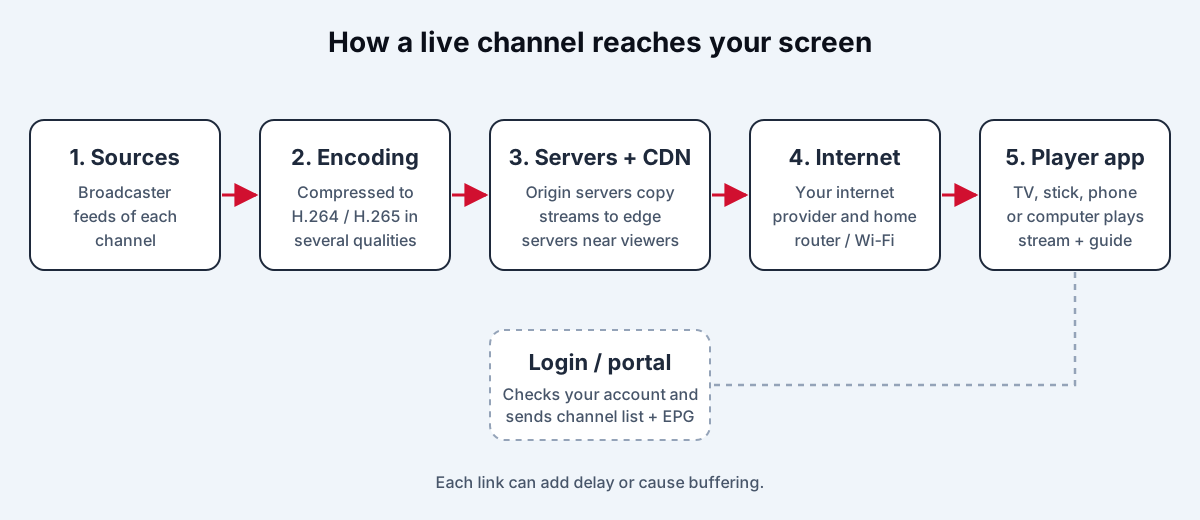
- Sources — the incoming feeds of each channel.
- Encoders and transcoders — compress each feed and often produce several qualities (for example HD and SD) for different connections.
- Origin servers — hold the master copy of each live stream.
- Load balancers — spread viewers across many servers so none is overloaded.
- Edge servers / CDN — servers in different regions, close to viewers, that copy the stream from the origin and deliver it locally.
- Middleware / portal — the service that checks your login and gives your app the channel list, guide and stream addresses. This is the "server URL" in an Xtream Codes login.
When a provider talks about "our server", it may mean any of these. A well-run service has redundancy at each layer.
Why server location matters
Every request your app makes — starting a channel, loading the next few seconds of video — travels to a server and back. The further away the server, the longer each round trip:
- Start-up time — the first seconds of a channel need several requests; long distances add noticeable delay.
- Channel switching — each switch repeats the process.
- Resilience — long routes cross more networks, each a possible point of congestion.
Providers with edge servers in your region — or that use a commercial content delivery network with points of presence near you — give faster, steadier streams. For viewers in North America, a provider streaming only from European servers is at a disadvantage, and vice versa. Canadian viewers should look for servers or CDN presence in Canadian cities; see IPTV in Canada.
Peak load: the real test
A server that is fast at midday can buckle at 9 p.m. or during a championship game. What matters is headroom — spare capacity for the moments when everyone tunes in at once. Signs of insufficient capacity include:
- many channels freezing at the same moment during big events;
- slow channel start-up only at peak times;
- quality dropping to a lower variant during popular broadcasts.
Good providers add capacity ahead of major events and spread audiences across several servers and CDNs.
Redundancy and backup sources
Professional streaming keeps backups at every layer: two encoders per channel, several origin servers, multiple CDN routes. If one fails, the stream continues, sometimes with a brief glitch. Some IPTV providers expose backups to users as alternative channel entries or as "server 1 / server 2" options in their app. That can help you work around problems — but needing to switch servers often is a sign of fragile infrastructure.
Portal addresses and DNS
Your Xtream Codes "server URL" is the address of the provider's portal. Legitimate providers keep it stable. Providers that frequently send new portal addresses or "new DNS" are usually responding to blocking — a strong sign that the service is unlicensed and may stop working without warning. See where to buy an IPTV account safely.
How to test a provider's servers yourself
You don't need special tools for a useful check.
Ping and route
On a computer, open a terminal or command prompt and run ping followed by the host name in your server URL (without http:// or the port). Note the average time and whether results vary a lot. Lower and steadier is better; under about 50 ms is very good for same-continent servers. Some servers block ping, so a lack of reply isn't necessarily a problem.
Peak-time viewing
Watch your must-have channels between 8 and 11 p.m. and during a major live event. Count freezes and time channel changes. Our reliable IPTV testing method has a table you can use.
Two networks
Test on your home connection and a phone hotspot. Problems on both point to the provider's servers; problems only at home point to your network — work through Stable IPTV.
Questions to ask a provider
| Question | A good answer |
|---|---|
| Where are your streaming servers or CDN? | Named regions close to you |
| How do you handle big live events? | Extra capacity, multiple servers/CDNs |
| Do channels have backup sources? | Yes, with automatic failover |
| How stable is the portal address? | It rarely or never changes |
| What happens during an outage? | Status updates and a clear refund policy |
Signs it is time to change provider
Server problems you can't fix at home tend to show a pattern. Consider switching if you notice several of these over a few weeks:
- Freezes on every channel at the same moment, on more than one network.
- Start-up times that get noticeably worse every evening.
- Regular "server down" messages or requests to switch to a backup server.
- New portal addresses or apps being sent every few weeks.
- Support that can't explain outages or offer compensation under its refund policy.
Keep a short log of dates, times and channels affected. It makes conversations with support concrete and helps you decide on facts rather than frustration.
Frequently asked questions
What does 'anti-freeze' actually mean?
It is a marketing term, not a technical standard. It usually refers to larger buffers, backup sources or automatic quality switching. Judge it by testing peak-time playback, not by the label.
Does a VPN make an IPTV server faster?
Usually not. A VPN adds an extra hop and some encryption overhead. It helps only when your internet provider throttles or poorly routes traffic to that server — test with and without it.
Why does my provider give me several server addresses?
To spread load across servers or to provide backups. Addresses that keep changing every few weeks, though, often mean the service is being blocked.
Is a lower ping always better?
Lower ping speeds up start-up and channel switching, but a stable ping (low jitter) and enough bandwidth matter more for smooth playback once a stream is running.
The bottom line
The best IPTV server isn't a single machine; it's a well-built delivery chain with capacity to spare, servers close to you and backups when something fails. You can't see the infrastructure, but you can see its results: fast start-up, stable peak-time viewing and a portal address that doesn't keep changing. Test for those and you'll know whether a provider's "premium servers" are real.
iptv servercdnlatencyload balancingserver location